Licensing
XRTracker uses a tiered licensing system. The Free tier works out of the box with no registration — just install and start tracking.
License Tiers
| Tier | Tracking Limit | Watermark | Commercial Use | Licensing Mode | Cost |
|---|---|---|---|---|---|
| Free | 60 seconds per session | Prominent | No | — | Free, no signup |
| Trial | Unlimited for 15 days | Prominent | No | Per-seat | Free (registration) |
| Developer | Unlimited | Subtle | No | Per-seat | Paid (yearly) |
| Commercial | Unlimited | None | Yes | Node-locked | Paid (yearly) |
For pricing, volume licensing, or OEM arrangements, contact sales@formulaxr.com.
Purchased from the Unity Asset Store?
Activate your license directly in Unity: Tools > XRTracker > Activate Asset Store License in the menu bar. Just enter your Asset Store invoice number, name, and email — your .lic file is generated and configured automatically.
Alternatively, you can activate on the website to download the .lic file manually.
Free
The default when no license file is present. Tracking works fully for 60 seconds per session. After the limit, tracking pauses and a message appears on screen. Restart the app or Unity Editor to reset the timer.
Model generation in the Editor is not restricted — you can prepare your project fully before evaluating tracking.
Trial
15 days of unrestricted tracking with a prominent watermark. Contact support@formulaxr.com to request a trial license.
Developer
Paid yearly subscription, per seat. Each developer using XRTracker needs their own license — licenses cannot be shared between team members. No time limit, subtle watermark. For development and internal testing only.
Commercial
Full production license, paid yearly. No watermark, no restrictions. Node-locked to a specific machine via hardware ID. Required for any production deployment.
Activating a License
- Place your
.licfile anywhere in your Unity project (e.g.,Assets/Licenses/) - Select the XRTrackerManager in your scene
- Drag the
.licfile into the License File field
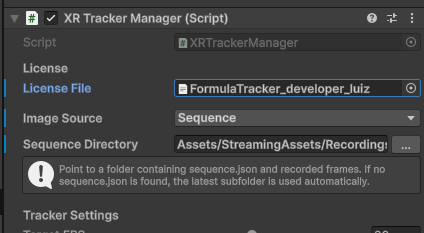
That's it. XRTracker validates the license on Play Mode entry and at app startup.
License File Inspector
Select any .lic file in the Project window to see its details in the Inspector: tier, licensee, expiry date, signature status.
For Builds
Embed the license in your build by assigning it to the License File field on XRTrackerManager. The .lic TextAsset is included automatically.
Alternatively, place the file in StreamingAssets/ — XRTracker searches there if no embedded license is assigned.
License Search Order
- Embedded TextAsset (License File field on XRTrackerManager)
- StreamingAssets/*.lic (first
.licfile found) - persistentDataPath/FormulaTracker.lic
- Auto-generated Free license (if nothing found)
Machine ID
Commercial licenses are node-locked — bound to a specific device via its machine ID.
Obtaining the Machine ID
There are two ways to get the machine ID:
In the Unity Editor (desktop): The machine ID is shown in the XRTrackerManager inspector during Play Mode. Use the Copy button to copy it for license requests.
On device (iOS/Android): When running with a Free, Trial, or Developer license, a Copy Machine ID button appears in the bottom-right corner of the screen. Tap it to copy the machine ID to the clipboard.
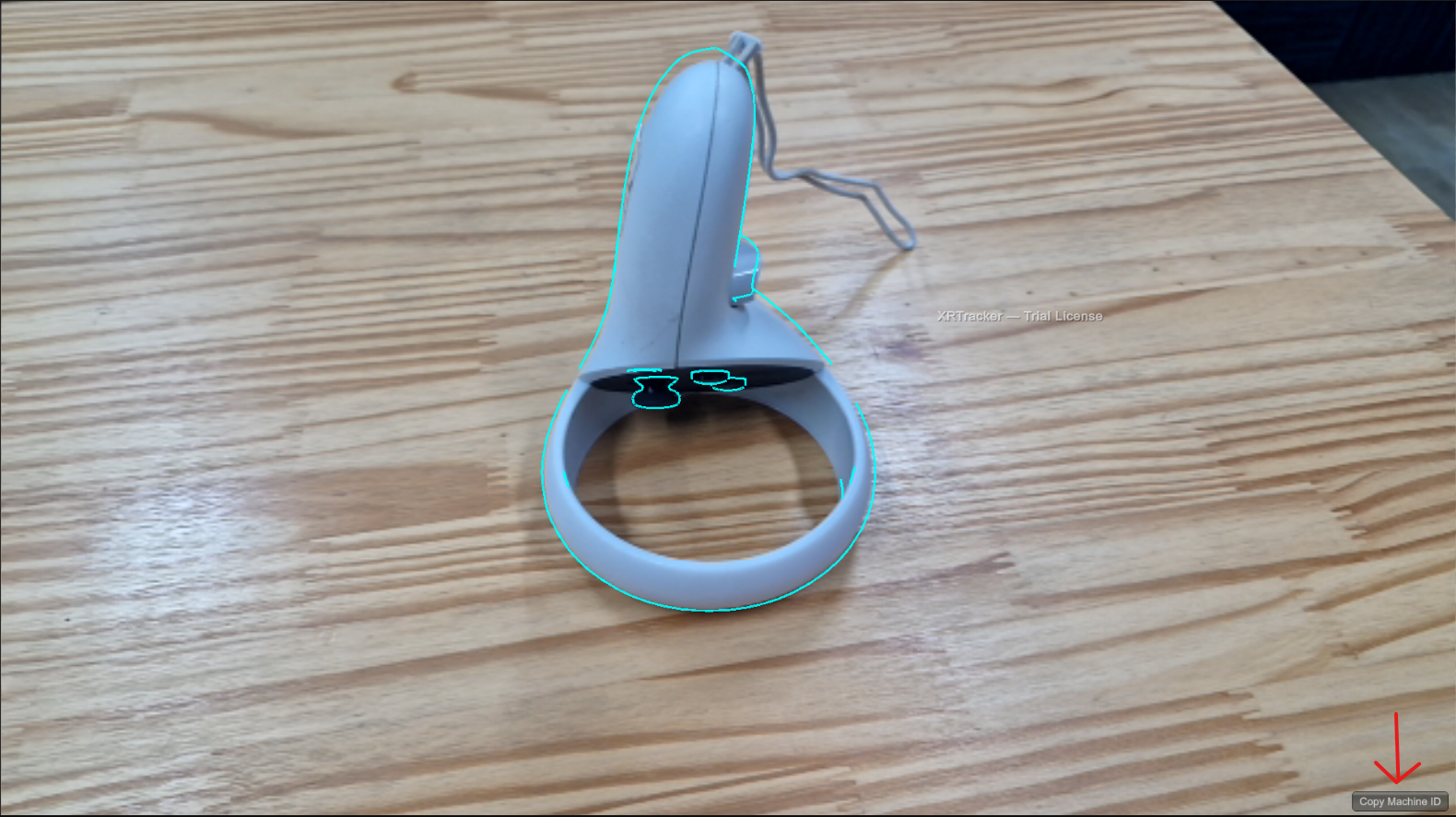
The machine ID is also logged to the console at startup, so you can find it in Xcode (iOS) or Logcat (Android) logs.
iOS Machine ID
On iOS, the machine ID uses Apple's identifierForVendor. This ID will change if the user uninstalls all apps from your vendor and reinstalls. Request a new license if this happens.
Client Deployment
If you are building an application for a client or end user, each device running the application requires its own Commercial license. Your Developer license covers your development machine only — it does not extend to your clients' devices.
For volume licensing or OEM arrangements, contact sales@formulaxr.com.
Legal
For full license terms, permitted use per tier, and redistribution rules, see the Terms of Use & License Agreement.
XRTracker collects anonymous usage metrics on Free, Trial, and Developer tiers. Commercial license holders are exempt. See the Privacy Policy for details.